Showing posts with label Freebies. Show all posts

Sunday, 1 May 2011

free flash photo galleries + free swf hosting

Just stumbled upon this:
A lot of these are freebies and some of them could look really cool on a custom designed header, or embedded into a page post as a photo gallery.

In order to be able to do this you will need to host your swf file somewhere - unless you have your own server or a remotely hosted site, that is. Here are a couple of places that seem to do the job, for free:

.................................................................................................................................

Thursday, 21 April 2011

finding the broken URL's on your site

If you have a big site with many pages, especially one with lots of images that you have linked to externally (or just a lot of regular links for that matter), it may end up becoming very difficult to keep track of whether everything is still in working order.

The free application below, developed by a very nice gentleman named Tilman Hausherr, does a scan which took about 5 minutes to complete for my HVC site, which has a huge number of links at this point. Found 2 missing images and one broken text URL. Of course, I had no idea that they were even gone! Very impressive!

Download, install and run to see how well you are doing with your URL's:

.................................................................................................................................

Monday, 11 April 2011

the outbrain post recommendation gadget/widget

Fırat has just found us another goody:


This website installs a gadget on your blog which puts recommendations underneath your posts, directing your readers to other related posts through thumbnails. Very neat for sites which have a lot of images in their posts. I have already put it into the visual communication history blog where it will make sense to have it since I do have a lot of images on that one.

Although the gadget configures it's appearance based upon your CSS there are still a couple of design problems with it: The "You might like" thingy, for one. Not sure if this is needed in the first place - stating the obvious it seems. But even if we do need it, do we need it to be quite that large? And bold? And then those fat wide borders around the thumbnails too, I could certainly live without...

I added a dotted line at the bottom of the posts, with an added space ( ) underneath it, and that seems to help since it gives the gadget a bit more negative space to breathe in. And yes, unfortunately once one starts one has to do this to all of the past posts as well, since the thumbnails appear on the entire blog. No sweat, did that too. Just a fast copy paste job really, took all of 10 minutes or so.

However all nit picky stuff aside, this is a very cool thing indeed. So, once again, thank you Fırat!

.................................................................................................................................

Monday, 4 April 2011

design: using photoshop plugins for website backgrounds and effects


geek.folk goes elegant ;-). This is to show you how to use photoshop plugins and filters to achieve effects on your background and header.

I didn't change much from the previous layout and even the glass buttons are still here, except that I applied a dark layer style to them this time.

On the background I used a plugin named Sinedots II, freely downloadable, courtesy of a very generous gentleman named Philipp Spoeth, who has been making this wonder available (PC only - ouch!) right here >>> for a very long time. Just place it in your plugins folder and the rest is fairly self-explanatory, although there are a few tutorials on it available on the download page as well. In this case I just applied the plugin onto the full canvas and then used a layer mask to delete the top and the bottom. Moved it up to where I wanted it to be, and that was that. In any case, this is such a beautiful filter that it would be kind of hard to go wrong with it no matter how you use it...

On the header, where I switched the font to Bauer Bodoni this time, I used the standard photoshop lens flare filter which is under Filters > Render. Now, here is the trick with that: It is actually quite difficult to get this to sit exactly where you want it to sit. What I do is, I create two layers in the same color, and then put the lens flare dead center in the middle of the top layer. Apply a gradient on a layer mask from all 4 sides  (Tip:  make sure you have the gradient colors going from solid black to transparent white, otherwise you will keep painting over what you are doing  )  then move, rotate, resize the flare to exactly where you would like it to be - which in my case is behind the header text so that I get a nice highlight there to offset the dark typography.

(Note: If I were to actually make such a site, I would place the flare on the background, together with the sinedots effect, so that the content slides over it as the viewer scrolls downward).

And you can see everything that I did in the photoshop file which you can download from here >>>.

.................................................................................................................................

Friday, 1 April 2011

creature house expression

This is probably the greatest vector drawing software that has ever been made. Basically Creature House Expression lets you draw smooth vectors (as intuitive as a real brush if you also have a tablet) which can become the most gorgeous water color strokes you could ever possibly wish for! It will also transform type and all sorts of other vector shapes (you can open Illustrator or EPS files), into painterly effects, which you can then export back out as a 24 bit PNG image with full transparency at whichever size you want.

It used to be freeware but then the rumor has always been that Microsoft bought it up and integrated it's key properties into their design suite Microsoft Expression (not to be sneezed at either by the way, excellent package in fact!) and took the free version off the shelf.

And then today I read somewhere that this wasn't so, and that a free download of Creature House Expression, for both PC and Mac, was still hidden away somewhere in the depths of the Microsoft Expression website. And sure enough, a bit of burrowing around and I found it:
http://www.microsoft.com/expression/expression-design/Default.aspx
Just downloaded it, installed it, and YAYY! It is a fully functional software!


Go go go! What on earth are you waiting for? Download now! Before they change their minds over there!

 Note:  I have quite a few additional creature house strokes and environment maps, which I downloaded back when the software was all over the place and people were developing freely downloadable stuff for it. I have put them all here:
http://www.citrinitas.com/easy-peasy/creaturehouse-stuff.zip
The strokes go to C: \ Documents and Settings \ All Users \ Application Data \ Creature House \ Expression 3 \ Strokes. And the environment maps go to the same location except Application Data \ Creature House \ Expression 3 \ Images \ EnvMaps on a PC. Where they all end up on a Mac, I have no idea.

You can also purchase a huge package of brushes for the software (very reasonably priced) from here:
http://www.graphicxtras.com/products/express.htm

.................................................................................................................................

Wednesday, 30 March 2011

splashup - another great online image editor


Beautiful dark, elegant interface. Makes one feel good just to look at it. You can edit and save images from and to various online domains, including Flickr and Facebook, as well as from and to your own hard drive, of course. And it seems to have quite a few of the necessary bells and whistles - such as layers, layer effects, filters and so forth...

Check it out here: http://www.splashup.com/

.................................................................................................................................

Tuesday, 22 March 2011

pixie CMS

Pixie, a "small, simple", user friendly, (and free!) HTML editor, again comes to us via four Yip, my Second Life colleague and brilliant Dutch artist and illustrator.

.................................................................................................................................

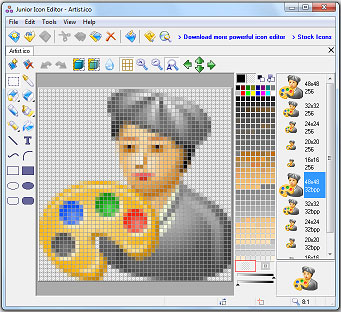
free icon editor

Nice little tool:
http://www.free-icon-editor.com/
:-)


.................................................................................................................................

Sunday, 20 March 2011

custom cursors

A friend of mine from Second Life, four Yip, has seen the easy peasy site and has given me a huge list of resources, of which I will be making good usage! Thank you four Yip :-) 

So, here is one of them: Would you like a custom cursor for your site?

Think carefully before you say yes. While some people (myself included) will love them, others may become highly irritated by them; especially since they will not be getting the little hand thingy for the links. That said, if the answer is still yes - here is a good place for them: http://www.cursors-4u.com/


Find the one which you think will work well with your overall design scheme and then copy the code from the little box underneath it where it says "universal CSS/HTML code for your web page".

Now comes the important part: Paste this code onto a text file first since you will need to do some serious cleaning up before you can put it into the HTML editor. Here is what the code will look like:

<style type="text/css">body, a, a:hover {cursor: url(http://cur.cursors-4u.net/others/oth-6/oth580.cur), progress;}</style><a href="http://www.cursors-4u.com/cursor/2011/02/16/sapphire-9.html" target="_blank" title="Sapphire"><img src="http://cursors-4u.com/support.gif" border="0" alt="Sapphire" style="position:absolute; top: 0px; right: 0px;" /></a>

Delete everything that is highlighted with red! Only keep the stuff that is highlighted with white, from <style type> to </style>, in other words. If you do not do this you will get a little "support Cursors4U" banner on your site. Which, in this case I find a bit excessive since Cursors4U seems to be doing quite nicely with lots of advertisements already.

Next step: Take the cleaned up code and paste it into the <head>, at the very bottom, just above the line which says <b:skin><![CDATA[/* and before </head>.

Done! You now have a custom cursor!

.................................................................................................................................

Thursday, 17 March 2011

all kinds of menus

You can find some very nice custom menus at http://bloggerhowtotips.blogspot.com/


The image above shows you a selection from the available styles which you can generate on the site. On the left are vertical HTML/CSS menus and on the right are drop down vertical menus. Both pages give you the codes for all of the different design styles and also tell you exactly how to use them, which incidentally is through yet another HTML/CSS gadget - love these things!


And then there is also a smoothly animated multilevel drop down menu; again you can obtain the code for this from here, and again, this too works through the HTML/CSS gadget.

.............................................................................................................................

Wednesday, 16 March 2011

bitmap/pixel fonts

http://www.dafont.com/bitmap.php

Now that we are beginning to speak about image based menu items - the above link will take you to one of the best collections of free bitmap fonts online.

 (Note:  Since bitmap fonts are based upon an exact pixel count they need to be used at the exact specified size which you will see all the way to the right on the red bar above the font preview. (Typographic point sizes correspond to the pixel size at 72 ppi screen resolution by the way). So, be sure to have the right size - anything less or more will make the font break up in really ugly ways.  ) 

 (Also:  Remember to set the anti-aliasing value to "none" from the pull down menu on the font palette, as shown in the screenshot below, since this value is what will give you the crystal clear sharpness that you want from a bitmap font.   ) 


.................................................................................................................................

Sunday, 13 March 2011

huge big GUI elements pack

There are some really nice people out there: All WebAlys asks of you is that you link back to the page from where you got these elements. This is a mega pack, containing icons, various types of GUI components, and a styles library for Adobe Illustrator.


The download page is here:
http://www.webalys.com/design-interface-application-framework.php

 (Important:  Once again, remember that if you use any of this the author will have to be credited through a link-back to the above URL.  ) 

...............................................................................................................................

a very nice set of buttons


For those of you who want to build a website from scratch, these are crisp and clean vector files which you can download in Illustrator format, as a JPEG or as an SVG file. And bloggers might also make good usage of them inside posts or even with custom created widgets on the sidebar. 

So, go get them while they are hot: http://www.gosquared.com/liquidicity/archives/96

free vector editor

Speaking of free software, this seems very nice also. An opesourced vector editor called inkscape: http://inkscape.org/


Not an online application by the way, has to be downloaded and installed. But still definitely worth checking out!

.................................................................................................................................

Saturday, 12 March 2011

free online image editors

You may or may not have a state of the art image editor such as photoshop installed on your computer. While I cannot say that the alternatives will do just as well, the following may still work as good stop gaps, especially for basic tasks.


Pixlr claims to be the most sophisticated online image editor and it certainly lets you do a lot with your images, including working with layer masks and so on. You can also import images from flickr, picasa and facebook,  edit them and save them back to their original locations. Very nice!


The same also goes for FotoFlexer, again you can import images from various web domains and then play with a lot of effects, as well as add type and shapes to them.


Sumo (my favorite after pixlr) is a free online image editor with some very nice plugins and a very easy to learn interface.


Phoenix is less sophisticated as far as plugins go however the company which puts out this image editor also has an online procedural filter creator which allows you to create some very impressive filters of your own. One of the really cool online image manipulators is Lunapic, which lets you also add animations to still images which you can then save onto your harddrive.

And finally, although not online applications, gimp and paint.net are completely free and very close contenders to costly image editors such as photoshop.

.................................................................................................................................

Thursday, 10 March 2011

webtreats...

... is so nice that it deserves a post of it's own. You can get all sorts of things from here, including background patterns - but much more as well: Photoshop presets for one thing - brushes, custom shapes, really cool layer styles - and then even layered photoshop files for web sites and themes. Check it out - you will love it!


http://webtreats.mysitemyway.com/

................................................................................................................................

Sunday, 6 March 2011

design + logistics: images - where to find them...

It is all very well to talk about nice background images, but where do you find them?

One obvious answer would be that you are an enthusiastic photographer and create your own content. Another one would be that you are a dab hand at image processing and assemble your own material on an image editor. (Which is, of course, a really cool thing to do and we will certainly be talking more about this later). But, let us say that you are neither - you do not take photographs and you do not make digital art either. In that case your best option is to look for online stock photography and vector art.

stock.xchng is a stock photography portal which makes its content available to you under various types of creative commons licenses. You first need to register and this is free. Once you are a member, the site gives you a brilliant advanced search menu through which you can find images which you can then also put under themed lightboxes, which hold up to 60 photographs each. Please make sure to read the terms and conditions of all the photos which you use. I actually went ahead and put together a few background image lightboxes for you, which you can look at also:
http://www.sxc.hu/browse.phtml?f=lightboxes&lid=603779
http://www.sxc.hu/browse.phtml?f=lightboxes&lid=603775
http://www.sxc.hu/browse.phtml?f=lightboxes&lid=603769
http://www.sxc.hu/browse.phtml?f=lightboxes&lid=603757
http://www.sxc.hu/browse.phtml?f=lightboxes&lid=603753

You can obviously search for images on google. However, when you do so, be sure to apply the correct licensing filter from the advanced search page:
http://www.google.com/advanced_image_search

Another very obvious place to look for images is Flickr. If you do not already have a Flickr account, I would advise you to start one immediately. However, I do not think that you even need to be a member to find photos on Flickr. The thing to remember is that not all of the content on Flickr is free to use, in fact most of it is "all rights reserved". So, when you search, you need to go to advanced search, scroll all the way to the bottom of the page and check the creative commons boxes. Flickr is absolutely massive and even with the cc restriction applied, it will give you far more results than just about any other photo sharing domain.


Above are two images that I found on Flickr, doing a creative commons search for "abstract background". Total search result was 11.211 btw. Certainly no shortage... One thing to be aware of is that some of these images are not large enough and so they may need some additional work in an image editor (more on what to do later) ;-)

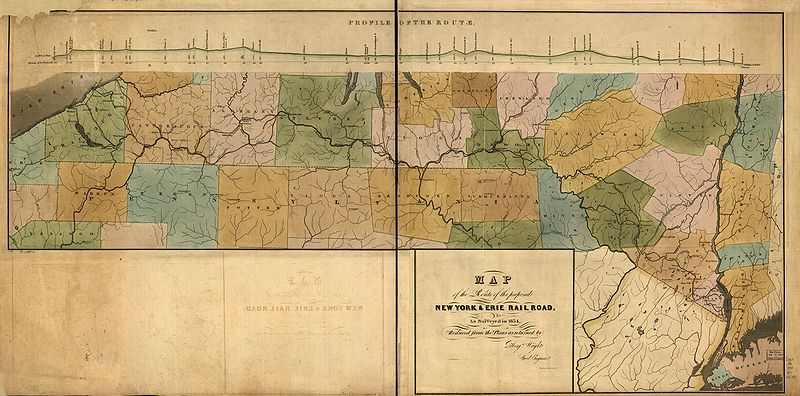
A cool place to find creative commons images (and all sorts of other cool stuff) is wikimedia commons. These will be categorized under specific topics, so they may or may not be good for background images. However, if your site is on a specific topic for which wikimedia commons provides visual content, this may be a good place to look also. Going to the category for large images may find you lots of unexpectedly nice stuff:


The map is abstract enough that it could work with a lot of subjects. The ducks are more problematic, of course - but I can certainly see how a number of these old fashioned prints, nicely cropped and pulled up in random fashion (more on this later) could work with all sorts of subjects.

 (Tip:  Whatever you do as you are searching for visual material, do not use google or yahoo image search in their default state - but only with the correct licensing filters. You really have no way of knowing if the images you find are available for free usage otherwise. And there is certainly enough good stuff out there that you can use without having to resort to shady means.  ;-) 

................................................................................................................................
Girls Generation - Korean